Aiseesoft iKnockin - Desbloqueador de iPhone
 100% seguro. Sem anúncios.
If you forgot your Apple Account password or bought a used iPhone that is still linked to someone else's account, you may wonder how to remove the iCloud account without a password. The right solution depends on three different situations: whether you still have access to the device, whether you can verify ownership of the account, and whether the device is stuck on Activation Lock.
This guide separates those situations and provides the correct method for each. It prioritizes Apple's official recovery and removal options before covering third-party tools.
Before removing an iCloud account from your iPhone or iPad, take a few precautions to avoid data loss and identify the right removal method. Depending on whether you can access your Apple Account and whether Find My is enabled, the available options may differ.
Some Apple Account removal or unlocking processes may erase your device. Before proceeding, back up important data such as photos, contacts, messages, and other files whenever possible. If you can still access your Apple Account and iCloud settings, you can try backup up iPhone to iCloud. If you have forgotten your Apple Account password, you may not be able to access your iCloud backup settings. In that case, try fazendo backup do iPhone para o iTunes.
Before choosing a removal method, check whether you can access your Apple Account and whether Find My is enabled (You can go to "Settings" > tap [Your Name] > select "Find My" > "Find My iPhone" to see whether it is enabled).
If you can access your account but have forgotten your password, try resetting Apple Account password through a trusted device or try using iforgot.apple.com to reset Apple passcode.
If Find My is not enabled, you can directly sign out of iCloud via Settings using your device passcode (by going to "Settings"> tap [Your Name] > "Sign Out" > follow the instructions on the screen to enter your device passcode and remove iCloud) or reset de fábrica do seu iPhone to remove the Apple Account. But if it is enabled, you have to enter your Apple Account credentials to remove the Apple Account. If you perform a factory reset, it will only trigger the activation lock, and you have to contornar o bloqueio de ativação using your Apple Account.
If you forgot your Apple Account password but still have access to an iPhone, iPad, or Mac where you're signed in, try resetting the password on such a trusted device first.
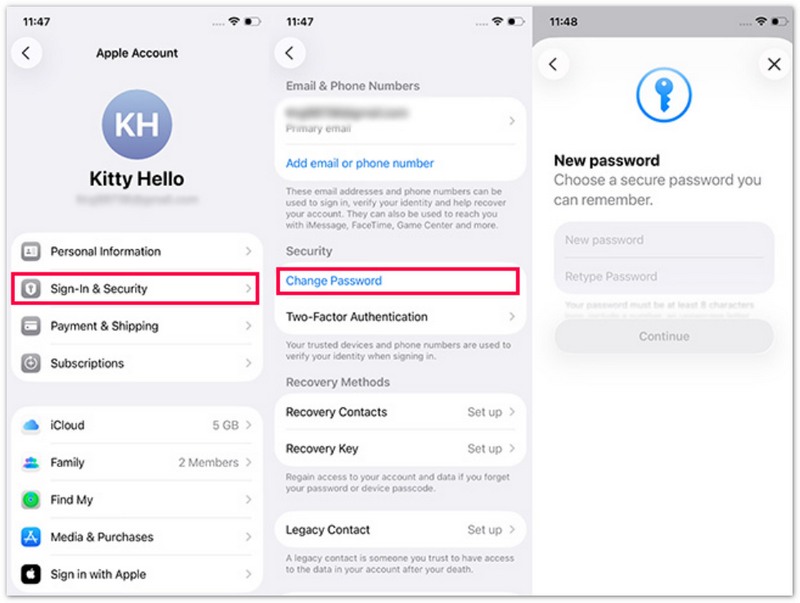
What If You Don't Have a Trusted Device? You can also try Apple's account recovery process, iforgot.apple.com resetting solution, to request an account recovery officially. This method may take several days, and once you regain access, you can use your new password to sign out of iCloud or manage your device.
If you bought a second-hand iPhone or iPad and it still displays "iPhone Locked to Owner", the previous owner's Apple Account is still associated with the device. You can ask them to remotely remove the device from their account.
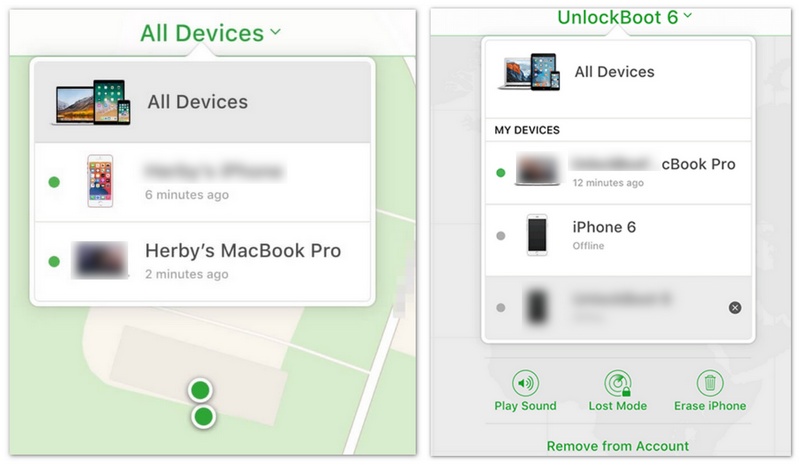
Observação: Erasing the device alone does not turn off Activation Lock—clicking "Remove This Device" is the essential step that officially unbinds the hardware from their Apple Account.
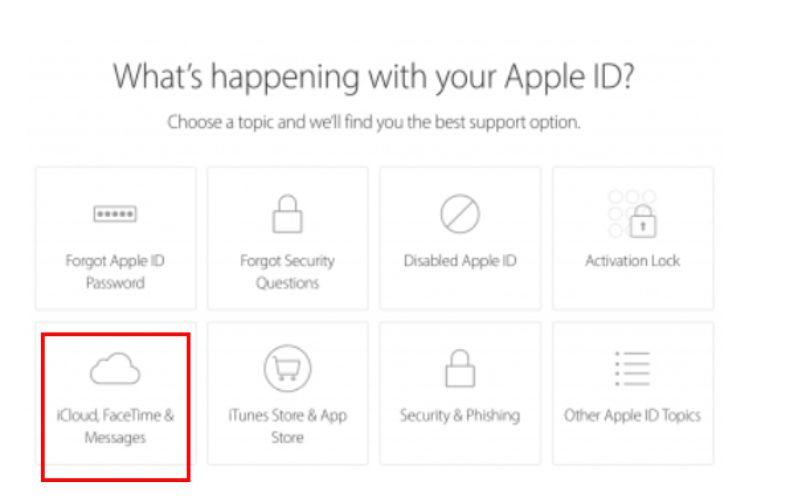
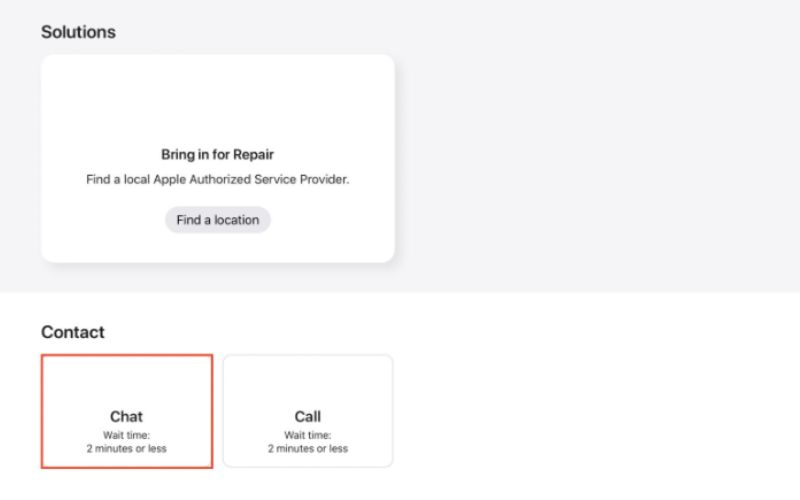
Se você não conseguir remover sua conta do iCloud usando uma ferramenta de terceiros ou preferir receber assistência mais formal, pode recorrer ao Suporte da Apple. A Apple possui políticas de segurança rigorosas, mas pode auxiliar na remoção da conta do iCloud sem solicitação de senha sob certas condições.
Passos para entrar em contato com o Suporte da Apple
Limitações
Now comes the final resort. When you have no trusted device, no access to the previous owner, or no proof of purchase verification, Aiseesoft iKnockin iPhone Unlocker can help you as the final choice. This is a professional iOS device unlocking tool to solve your iCloud account can't be removed due to a forgotten passcode, or other similar questions.
Downloads
100% seguro. Sem anúncios.
100% seguro. Sem anúncios.
Como usar o Aiseesoft iPhone Unlocker para remover a conta do iCloud
100% seguro. Sem anúncios.
100% seguro. Sem anúncios.
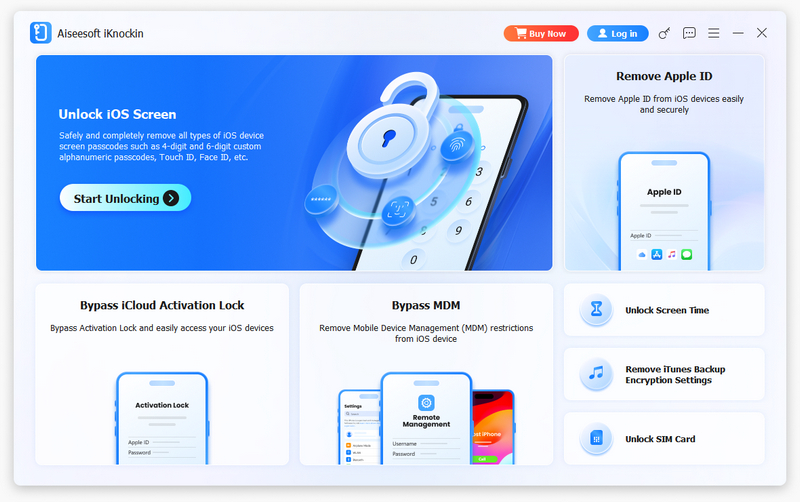
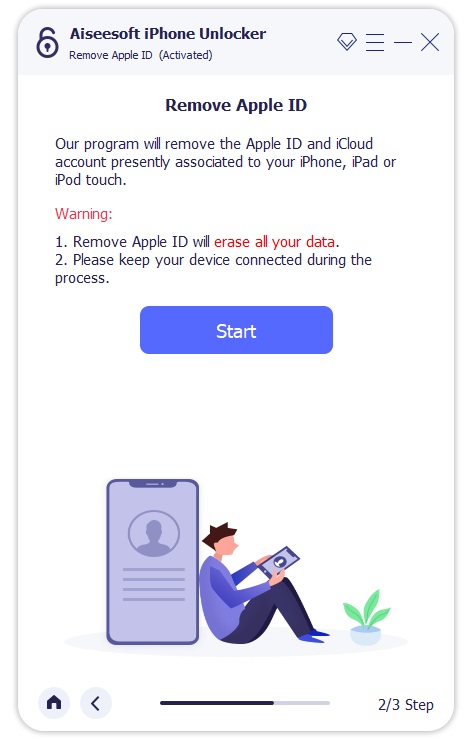
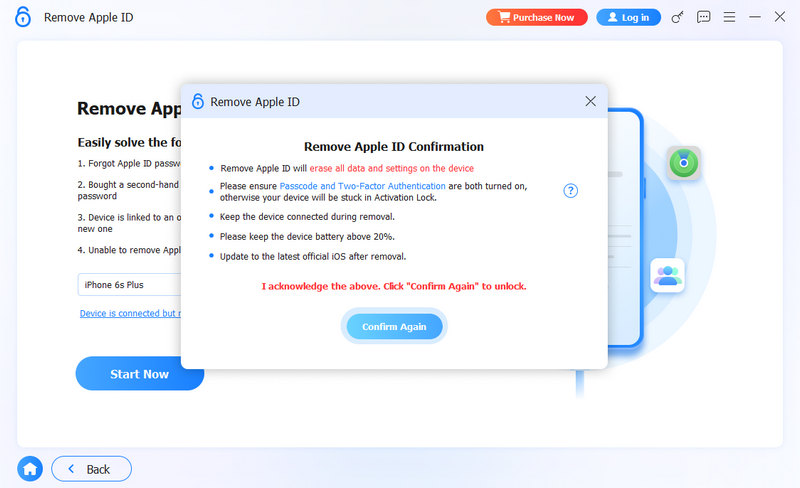
Com apenas alguns cliques, o Aiseesoft iPhone Unlocker fornece uma resposta simples para remover a conta do iCloud sem senha, ajudando os usuários a recuperar o controle total de seus dispositivos.
O que acontece quando você remove uma conta do iCloud de um dispositivo?
Remover a conta do iCloud desconectará o dispositivo do ecossistema da Apple, desabilitando serviços como backup do iCloud, Buscar, iMessage e FaceTime associados a essa conta.
A redefinição de fábrica do iPhone/iPad removerá a conta do iCloud?
It depends on whether Find My is enabled before the factory reset. If Find My is turned off, performing a factory reset through "Erase All Content and Settings" or restoring the device with iTunes, Finder, or Apple Devices will generally erase the device's data and remove the Apple Account signed in on it. Activation Lock will not remain enabled. However, if Find My is enabled, Activation Lock is automatically activated. Erasing or restoring the iPhone or iPad will not automatically remove this lock. The device may still require the original Apple Account credentials during setup.
E se eu comprei um iPhone usado e ele ainda estiver vinculado ao iCloud de outra pessoa?
Nesse caso, peça ao proprietário anterior para remover o dispositivo do iCloud por meio do recurso Buscar ou acessando iCloud.com. Caso contrário, você não conseguirá ativar o dispositivo.
Will Restoring an iPhone with iTunes Remove the Previous Owner's Apple Account?
This is the same situation as a factory reset. If Find My was turned off, restoring the iPhone with iTunes, Finder, or Apple Devices, or using "Erase All Content and Settings", will generally erase the device's data and remove the Apple Account signed in on the device. Activation Lock will not prevent the new owner from setting it up. However, if Find My was enabled before the restore, Activation Lock may remain after the device is erased. In this case, you must ask the previous owner to remove the device from their Find My account or contact Apple if you qualify for an Activation Lock support request.
Conclusão
Removing an iCloud account without a password can be challenging, especially when you can't access the original Apple Account or previous owner. If you're looking for an alternative solution, Aiseesoft iKnockin is worth considering. It provides a dedicated way to handle certain iOS unlocking issues, including Apple ID removal. Download iKnockin and follow its on-screen instructions to see whether your device is supported.
100% seguro. Sem anúncios.
100% seguro. Sem anúncios.
 Maneiras gratuitas e rápidas de ignorar a ativação do iCloud permanentemente
Como ignorar a ativação do iCloud? Esta postagem fornece a maneira mais rápida de ignorar o bloqueio de ativação do iCloud permanentemente. Para remover o bloqueio do iCloud, você também pode encontrar uma ferramenta útil de desvio do iCloud aqui.
 checkra1n iCloud Bypass e melhor maneira de remover o bloqueio do iCloud
O checkra1n suporta iOS 17 e ignora o bloqueio de ativação do iCloud? Existe uma alternativa ao checkra1n para remover o bloqueio do iCloud? Saiba mais sobre o bypass do checkra1n iCloud.
 Como remover o ID Apple do iPhone? Confira 4 métodos aqui
Deseja remover o Apple ID do iPhone roubado ou bloqueado? Leia esta postagem para excluir sua conta Apple ID no iPhone ou iPad sem senha.
 Deixe seu comentário e participe de nossa discussão
Bloqueio de ativação do iOS
Ignorar bloqueio de ativação do iOS
Desbloquear tela do iOS
Dicas do iCloud
Para corrigir o bloqueio da tela do iPhone, a função de limpeza de senha pode ajudá-lo muito. E você também pode limpar facilmente a senha do Apple ID ou do Screen Time.
100% seguro. Sem anúncios.
100% seguro. Sem anúncios.

*Campo obrigatório
*Por favor, insira um e-mail válido